
Now available on the iTunes App Store
Now available on the iTunes App Store
MIDIAnglo is an Anglo Concertina CoreMIDI control surface.
MIDIAnglo doesn't produce any sound on its own, it is for playing hardware or software VST-style MIDI synthesizers via CoreMIDI hardware interfaces connected to the iPad dock connector or virtual MIDI instruments like IK Multimedia SampleTank® for iOS running on your iPad.
Anglo-style concertinas are commonly used for playing traditional Irish dance tunes, and is a much-favored instrument in County Clare, Ireland.
The Anglo concertina is diatonic, meaning the instrument plays a different note for each button depending on whether you are pushing or pulling on the bellows.
In the app, to play, simply tip the iPhone/iPod Touch to the left for a bellows push note, or to the right for a bellows pull note, and press a button. The PUSH/PULL display on the bottom of the screen shows which direction the bellows is moving.
You may reverse the bellows while pushing a button simply by tipping in the opposite direction.
Multiple buttons (up to 5) may be pressed at the same time to play chords.
Note Guide (touch the '?' icon) shows the note names for each button when pushed or pulled.
Touch the '?' icon a second time for "Real-time Note Guide". This shows the notes for each button in realtime depending on push or pull.
Adjust the tilt sensitivity, right vs. left handed bellows pull select, and MIDI parameters on the settings page.
The button layout is based on a 17-key modified C/G Jeffries style.
Includes four beautiful background skins inspired by classic wood and black lacquer sided instruments.
(Touch the MIDI connector icon on the lower right of the main screen)
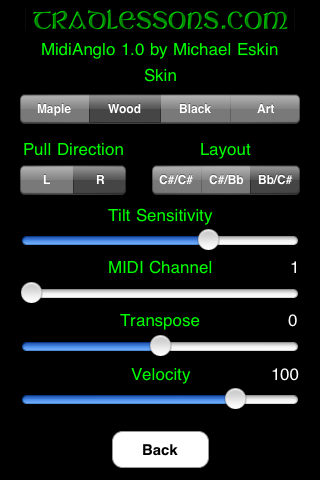
Touch the Tradlessons.com logo to go directly to my app catalog website.
Select your skin using the Skin selector.
Set the transmit channel using the MIDI Channel slider. Any channel from 1-16 may be selected. Channel 1 is the default. Multiple devices can simultaneously talk to the MIDI synth, just make sure each device is on its own MIDI channel.
If you want to transpose the pitches being sent out, you may set a transpose value up to +/- one octave in semitone increments on the Transpose (semitones) slider. No transpose is the default.
Note-on events are sent with a fixed velocity. Set the velocity using the Velocity slider. Any value from 0-127 may be selected. Default value is 100.
If you ever have "stuck" notes, you may touch the "!" icon on the main screen to send a MIDI "All Notes Off" message and stop the sounds.
All settings are saved when exiting MIDIAnglo and restored the next time it is run.
FAQ:
Q: I'm running a CoreMIDI virtual synth on my device, but I don't hear any sound when using your CoreMIDI control surfaces.
A: Please check that "Background Audio" is enabled on the virtual synth app you are running.
Also check that the virtual synth app has an active patch on the same MIDI channel(s) you are sending from the control surface app.
Q: Which other CoreMIDI synthesizer apps can be controlled by your control surface apps?
A: The iOS Musician website is maintaining a comprehensive list of apps that support virtual MIDI ports.
The majority of my testing has been with IK Multimedia SampleTank®.
Q: Where can I learn more about how to play the Anglo Concertina?
A: Please visit the following sites for more information and online learning materials:
Q: Now that I've learned the Anglo Concertina fingerings for some tunes on the iPhone/iPod Touch app, I'd like to buy a real instrument. Who do you recommend?
A: The Button Box carries a wide range of new and vintage instruments.
More Apps to Enjoy:
A huge thank you to Janelle Shane and Art Tawanghar for generously developing truly inspiring artwork for the background skins.
For more information, please contact Michael Eskin or visit the AppCordions website: